Guide › OBS
OBS: record your races without touching it
The Director Sportif knows when your race starts and when you finish, so it can run OBS for you. You set it up once, and on race day you just ride.
What it does
- Never miss the start. OBS starts recording 5 minutes before the race starts and stops 2 minutes after you finish. You don't have to click anything in the pen, and you won't end up with a three-hour file because you forgot to stop it.
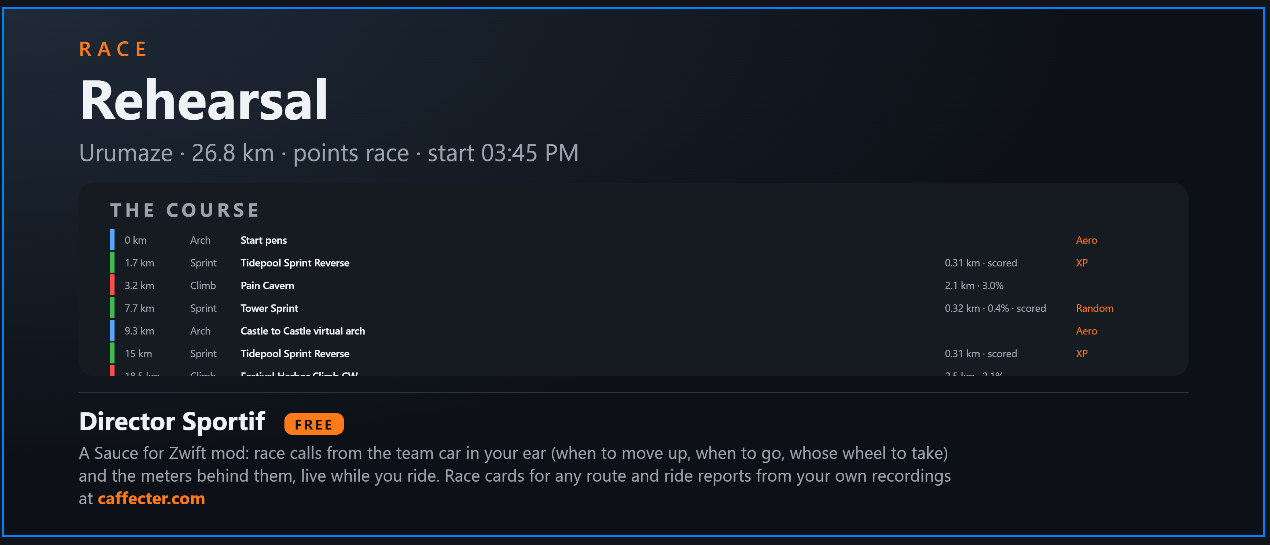
- A title card. The video can open on a card showing the event, the course from the race card and your plan, for 10–30 seconds. It's shown in its own OBS scene, then the video cuts back to your scene.
- YouTube chapters, ready to paste. When OBS stops, a text file lands in your Downloads with chapters timed to your video: the start, each climb and sprint on the race card, 1.5 km to go, your jump, and the finish.
- Moments in your video. Your ride recording notes when OBS started recording or streaming. A moment in the ride, like your sprint, can then be found at the right second of your video.
It only ever touches OBS's recording. It never starts or stops a stream; it just notes when one started.
Set it up (once)
You need OBS 28 or newer, which has everything built in, running on the same computer as Sauce or one it can reach.
- In OBS: go to Tools ▸ WebSocket Server Settings. Tick Enable WebSocket server, keep port
4455, and set a password. Show Connect Info shows the address and the password.
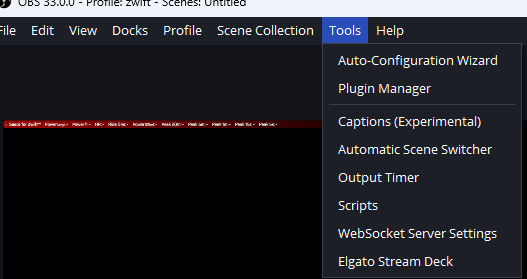
OBS ▸ Tools ▸ WebSocket Server Settings. 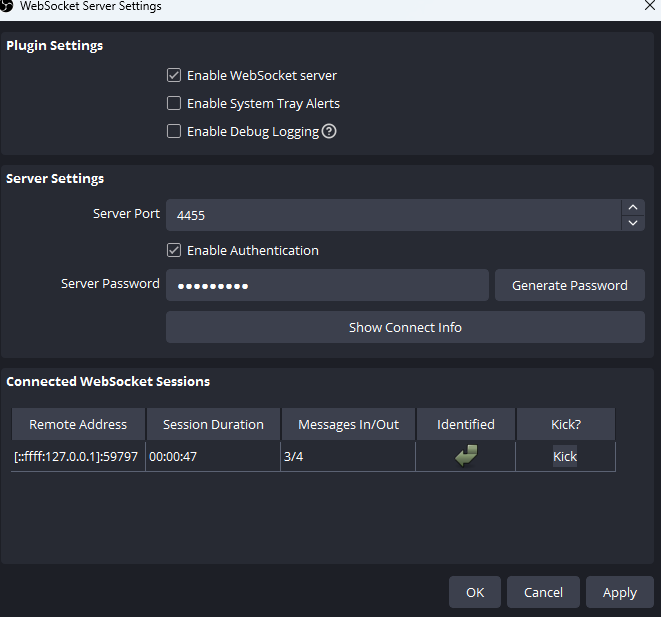
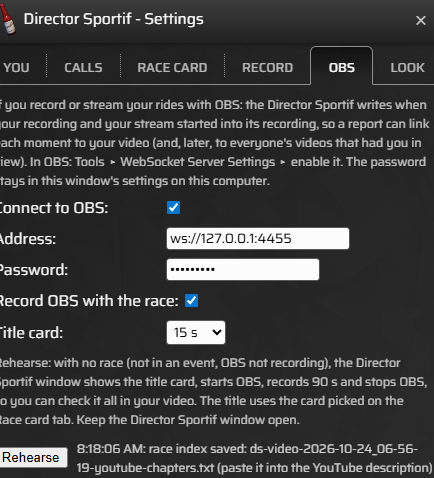
Enable the server, keep port 4455, set a password. Once the Director Sportif connects, it shows under Connected WebSocket Sessions. - In the Director Sportif window: open the gear and go to the OBS tab. Tick Connect to OBS,
then fill in the address (
ws://127.0.0.1:4455when OBS is on the same computer) and the password. The password stays in the window's settings on your computer and is never sent anywhere else. - Tick Record OBS with the race, and choose a Title card length (none, 10, 15, 20 or 30 seconds; 15 to start with). The title card needs Sauce's web server on (in Sauce's own settings). Its scene, Director Sportif: title, and its Browser source are made in OBS the first time it runs.
- On the Record tab, tick Record every event. OBS goes with the Director Sportif's own recording of the race, so this is what makes it start by itself. With it off, OBS starts when you press Record in the event.
- Press Rehearse on the OBS tab. Do this outside an event, with OBS not recording. The Director Sportif shows the title card, starts OBS, records 90 seconds, stops OBS, and saves the recording and a chapters file. Check the video before race day. How it went shows next to the button.
OBS can be closed, or started after Sauce: the Director Sportif keeps trying to connect, and a missing OBS never breaks a ride.
On race day
- Open OBS before or after Sauce, whichever you like, and join the event.
- In the pen, the Director Sportif window tells you what OBS will do, for example "OBS: connected · starts with the race in 3:20" (see below).
- 5 minutes before the start (or as soon as the race gets moving, if that's sooner), OBS shows the title card, starts recording, and cuts back to your scene. If you switch scenes yourself while the card is up, it leaves you where you are.
- 2 minutes after you finish, which leaves room for the results, OBS stops. Leaving the event also stops it, 2 minutes later.
- The chapters file is in your Downloads:
ds-video-date-time-youtube-chapters.txt. Paste it into the YouTube description, and YouTube turns it into chapters.
The rules it follows
- An OBS recording you started yourself is never stopped. If OBS is already recording when the race comes, the Director Sportif leaves it alone, and it still notes the time.
- Free rides leave OBS alone. Pressing Record in a free ride or your warm-up records your ride, not OBS.
- A recording that's already running still works. With Record all the time on, or Record pressed in your warm-up, OBS still starts when the event's time comes.
- A finished event never starts OBS again, even if you stay in it.
- Pen early, warm up, back in: leaving the pen before the race starts doesn't use up the event. OBS still starts with the race when you come back.
- A window reopened mid-race still stops the OBS recording it started, and still saves the chapters.
What the Director Sportif window shows
The Director Sportif window is one line: the text, then the Record and Mark buttons. OBS has no status line of its own. In the pen, the text takes turns showing the event, the race card, OBS and your bike, 4 seconds each. Once the race is on, the text is the calls, and OBS isn't shown; OBS itself shows that it's recording. The Record button reads "● 12:03" while the Director Sportif records your ride; that's your ride recording, not OBS.
The OBS message reads like this:
| You see | Means | What to do |
|---|---|---|
| "OBS: connected · starts with the race in 3:20" | All set: OBS starts 5 minutes before the race starts, in 3 minutes 20. | Nothing. |
| "… starts with the race now" | It's time, or the race is moving: OBS is starting. | Nothing. |
| "… once connected" | It's waiting for OBS. | Open OBS. It connects within a few seconds. |
| "OBS: not connected" | OBS isn't open, or the address or password is wrong. | Open OBS and check the WebSocket settings (below). |
| "… starts when you press Record" | Record every event is off, or you stopped this event's recording. | Press Record, or turn on Record every event. |
| "… looking up the start…" | It's asking Sauce when the event starts. | Nothing: a few seconds at most. |
| "OBS: recording 12:03 · stops in 1:40" | You've finished: it stops OBS in 1 minute 40. | Nothing. |
| "OBS: recording 12:03" | OBS is recording and nothing is planned: you started it yourself, so it won't be stopped for you. | Stop it yourself when you're done. |
| "title card skipped: …" | OBS started without the card; the reason follows. | Usually Sauce's web server is off: turn it on in Sauce's settings. |
| "race index saved: …" | The chapters file is in your Downloads. | Paste it into the YouTube description. |
The chapters
A chapters file looks like this:
0:00 In the pen
5:12 Race start
14:40 Fuego Flats sprint (points)
31:05 Volcano climb
33:48 Volcano climb: top
58:20 1.5 km to go
60:42 Sprint: jump
61:15 Finish- The climbs and sprints come from the race card for the course, named as the card names them; "(points)" marks the scored ones, and a climb also gets its top. Without a card you still get the start, 1.5 km to go, your jump and the finish.
- YouTube needs at least three chapters, starting at 0:00, so a file is only saved when there are three or more.
- With OBS 30.2 or newer recording to Hybrid MP4, the same moments are also added as chapter markers in the video file itself.
Showing the meters on your video
- Capture the Director Sportif - Grid window in OBS (a Window Capture source). Its title never changes, so OBS keeps finding it from one ride to the next.
- For a clean overlay, turn on Solid background in the Grid's settings (Look tab). Then add a Color Key filter in OBS for that color, which is green unless you change it.
- Want the advice words on the video too? Add an All words slot to the Grid: it's the same line the Director Sportif window shows. See the meters.
When it doesn't work
| What happened | Likely why | What to do |
|---|---|---|
| Never connects | The WebSocket server is off in OBS, or the address or password is different. | In OBS, open Tools ▸ WebSocket Server Settings ▸ Show Connect Info and copy both into the OBS tab. If a firewall prompt came up, allow it. |
| OBS didn't start with the race | Record OBS with the race or Record every event is off; OBS was already recording; or the Director Sportif window was closed. | Check both settings. Keep the Director Sportif window open, since it runs everything (it can sit behind Zwift). |
| No title card | Sauce's web server is off, or the title card is set to none. | Turn on the web server in Sauce's settings and run Rehearse. |
| Stuck on the title scene | OBS lost the connection while the card was up. | Switch scenes in OBS. The Director Sportif also switches back the next time it connects. |
| No chapters file ("race index not saved: …") | Fewer than three chapters, such as a very short video or OBS not recording in an event. | Check your Downloads after a full race. A rehearsal makes one too. |
See also: Install and first setup · The calls · The meters · The Grid · Recording · All guides