Guide › Install and first setup
Install and first setup
Ten minutes from download to your first ride with the Director Sportif: install it, open its two windows, and tell it three things.
Before you start
- Sauce for Zwift installed and working with Zwift (its Overview window shows your power and speed while you ride).
- A Windows or Mac computer running Sauce. The Director Sportif runs inside Sauce, so it works wherever Sauce does.
1. Install
- Download the latest
director-sportif-….zipfrom the releases page (under Assets). - Unzip it into your SauceMods folder. It's a folder called
SauceModsin your Documents folder; create it if it isn't there. When you're done there's adirector-sportiffolder insideSauceMods, with amanifest.jsonin it.Can't find Documents, or Sauce doesn't see the mod?
On Windows with OneDrive, your Documents folder is usually the one OneDrive keeps (
C:\Users\you\OneDrive\Documents), and that's where Sauce looks. PutSauceModsthere.Unzipping can add an extra folder level (
SauceMods\director-sportif-…\director-sportif\…). Sauce needsmanifest.jsonexactly one level down:SauceMods\director-sportif\manifest.json. - Quit Sauce fully and start it again. Closing its windows isn't enough: quit it from the tray icon (Windows) or the menu bar (Mac), then start it. Sauce only looks for new mods when it starts.
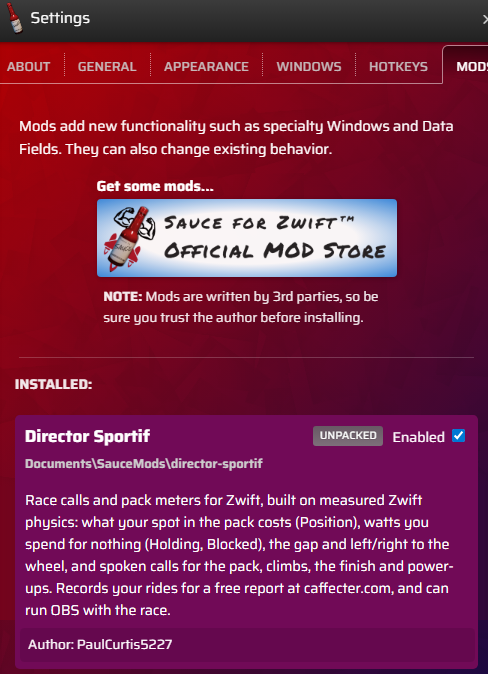
- Enable the mod. Open Sauce's settings (the gear on the Overview window), go to the Mods tab and switch on Director Sportif.
2. Open both windows
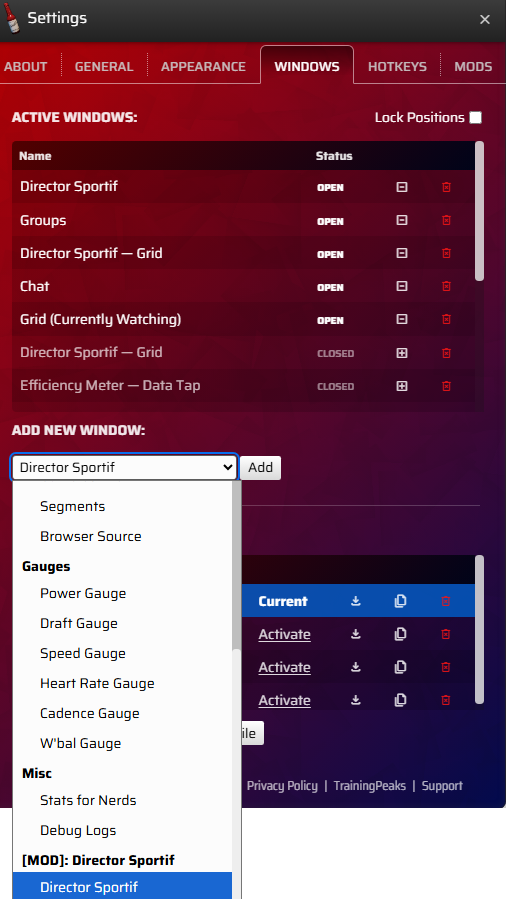
In Sauce's settings, on the Windows tab, use Add new window: pick Director Sportif, click Add; then pick Director Sportif — Grid and click Add again.
Director Sportif
The part that thinks. It reads Sauce's data, works out the meters and makes the calls. It's one line: what to do now (the call and each meter's advice in one place, yellow or red when urgent), then the Record and Mark buttons. In the start pen the text takes turns showing the event, the race card, OBS and your bike. Keep it open while you ride. It can sit behind Zwift; close it and the meters and calls stop.
Director Sportif — Grid
The display: the meters you choose, to place over Zwift or capture in OBS. It shows what the other window works out, and says "waiting for the Director Sportif window" when that window is closed.
Right-click a window to show its title bar. The gear in the title bar opens that window's settings.
3. First setup (two minutes)
All three are in the Director Sportif window's settings (its gear).
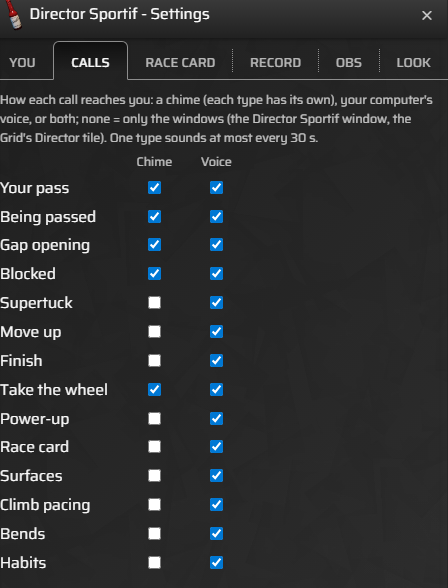
- Choose how you hear the calls (Calls tab). Each kind of call has a Voice and a Chime box. Out of the box the main calls are spoken: the gap opening, your pass, blocked, move up, steep, the finish, power-ups, your race card, surfaces, burritos and a missing heart rate. Bends and habits start off, and being passed is yours to choose. Below the list, tick Practice race to hear the race-only calls on any ride, and Bridge button for a button that plans your bridge to the riders up the road. What every call means.
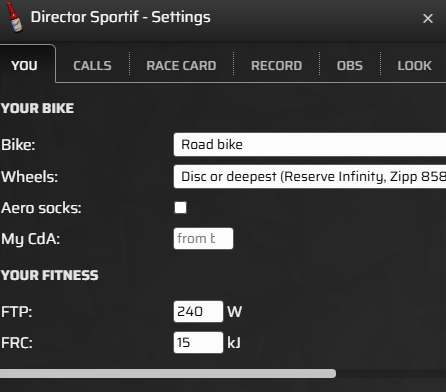
- Tell it about you (You tab):
- Bike and Wheels: Sauce doesn't say which bike you ride, and the meters use it for your drag. It starts at "Road bike" and stock wheels. When you join an event it checks the bike with you, and goes red in a time trial if it isn't a TT bike.
- FTP and FRC: for the FRC meter and the finish calls. Left blank, it uses your Zwift profile's FTP and 15 kJ. Max power is for the bridge plan; left blank, 4.5 × FTP.
- Aero socks and your own CdA are there too, if you know it.
- Lay out the Grid (the Grid window's gear). It starts with Position, Holding, Blocked, Wheel gap and L/R, numbers only: the words are on the Director Sportif window, in one place. Add, remove and order its slots there, show a meter's word under it if you want, set each meter's yellow and red range, and the text size: the Grid.
4. Ride
Join a group ride or a race. The meters fill once you're in a group (riding alone, the watt meters read 0), and the calls come as the race unfolds. A good first test on a group ride: put Position and Blocked on the Grid, sit right on a wheel for a minute, then ease back to 3–4 m on Wheel gap and watch Position drop; ride into the back of a wheel and watch Blocked jump.
Optional, when you want them
- Record your rides (Record tab): record every event, or all the time, and bring a recording to the ride report. Both start off: recording and ride reports.
- Race cards (Race card tab): make one for your event's route on the race card page and import it: race cards.
- OBS (OBS tab): start and stop recording with the race, with a title card and YouTube chapters.
Updating to a new version
- Download the new zip from the releases page.
- Delete the old
director-sportiffolder inSauceMods, and unzip the new one in its place. Your settings live in Sauce, not in that folder, so they stay. - Quit Sauce fully (from the tray) and start it again.
The version you're running is the "version" line in the manifest.json in
that folder.
If something's wrong
- Director Sportif isn't in the Mods tab: Sauce didn't find it. Check the folder (step 2 above) and quit Sauce fully before starting it again.
- The Grid says "waiting for the Director Sportif window": open the Director Sportif window (or re-open it if it was closed).
- You hear nothing: check the Calls tab has Voice or Chime ticked for that kind of call, and your computer's sound goes where your ears are. Calls come only when there's something to say: riding alone is quiet.
- The meters read 0 or stay blank: you're riding alone (watt meters read 0, distances go blank), or Sauce isn't getting data from Zwift (Sauce's own Overview window shows no power or speed either). If the Director Sportif window says "watching another rider", Sauce is watching someone else, and there are no calls until it's back on you.
More fixes: troubleshooting.
Next: The calls · All guides